AI TOOL / #01242
Photo Stitching (PixPix)
Combine multiple images into a long image grid
Introduction
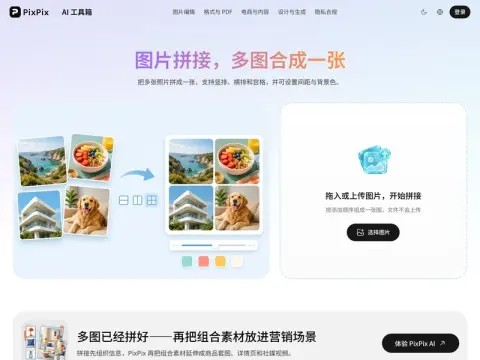
Combine multiple images into one and output it as a JPG, with three layout options:
- Vertical typesetting— Read the long image and tutorial from top to bottom.
- Horizontal typesetting— Before-and-after comparison, with A/B options presented side by side
- grid—— When displaying multiple similar photos, they look neatest when they are all the same size.
Setting the spacing to 0 creates a seamless stitch, which works well for joining long screenshots together; increasing the spacing makes each image stand on its own. Both the gaps and blank areas are filled with the background color, and these two settings largely determine whether the finished result looks like a polished piece or a casual mashup.
If the photo sizes don’t match, the grid will leave gaps that are filled with the background color. For the neatest result, first crop the photos to the same aspect ratio before stitching them together.
Related
Ssemble YouTube Shorts Maker
AI tools are used to transform lengthy content into engaging short videos.
New UGCLive
An AI editor that analyzes hit videos and generates UGC content based on those analyses
新SoundBoost Music Video
Upload the song to create a complete music video.
CueLab CRM
CueLab CRM helps businesses convert potential customers, streamlines the management of such prospects, and enables the management of customer relationships via mobile devices.
RIZZ AI
The AI dating assistant helps to improve conversations and increase the chances of successful dates.
The New “Say It Again”
Generate product-selling videos using the store link.