AI TOOL / #02175
Whoz
LinkedIn extensions, used to capture profile information and automatically populate the Whoz talent pool.
Introduction
LinkedIn extension to capture profiles and automatically populate Whoz talent pool.
What is the Whoz LinkedIn Extension for Chrome? What is this extension/piece of software?
The Whoz LinkedIn extension enables users to capture LinkedIn profiles and automatically add them to their Whoz talent pool. It simplifies the screening process by allowing users to directly add the profiles they are interested in to the Whoz database. Furthermore, it leverages Whoz’s AI capabilities to perform professional expertise assessments, evaluate the relevance of these profiles, track the recruitment process, and add notes during interviews.
How to use the Whoz LinkedIn Extension for Chrome?
1. Install the extension.
2. Go to Whoz, log in, and navigate to your Whoz workspace (any page that starts with https://www.whoz.com/workspace/…).
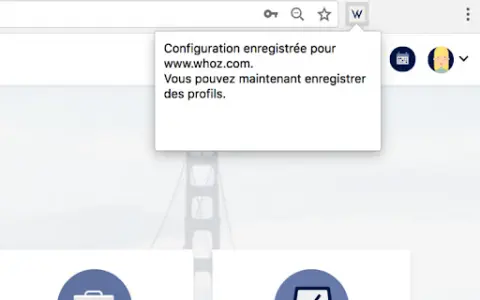
3. Click the expansion icon; a message confirming the configuration will appear.
4. Log in to LinkedIn, check your profile, and click on the extension icon. A confirmation message will appear in your Whoz talent pool, indicating that your profile has been added.
2. Go to Whoz, log in, and navigate to your Whoz workspace (any page that starts with https://www.whoz.com/workspace/…).
3. Click the expansion icon; a message confirming the configuration will appear.
4. Log in to LinkedIn, check your profile, and click on the extension icon. A confirmation message will appear in your Whoz talent pool, indicating that your profile has been added.
What are the core functions of the Whoz LinkedIn Extension for Chrome?
Automatically capture profiles from LinkedIn and import them into Whoz.
AI-based detection of professional knowledge and skills
AI-based assessment of profile relevance
Recruitment process tracking
Interview Notes
AI-based detection of professional knowledge and skills
AI-based assessment of profile relevance
Recruitment process tracking
Interview Notes
Related
StatAI
Free AI tools for startups to analyze business ideas, gain market insights, and conduct competitor research.
idoven.ai
AI-based ECG interpretation and cardiovascular care platform.
Outlier Database
OutlierDB provides advanced BJJ analysis, powered by AI search.
Cyware Threat Intel Crawler
The Cyware threat intelligence crawler utilizes machine learning/natural language processing technologies to identify and collect threat intelligence from the internet.
Capalyze
AI-powered data analysis assistant, designed to aid in gaining insights and making business decisions.
Analytics Model
An AI-powered analysis platform that provides personalized insights and helps in making informed decisions.