AI TOOL / #03920
ChatGPTalk Sidebar
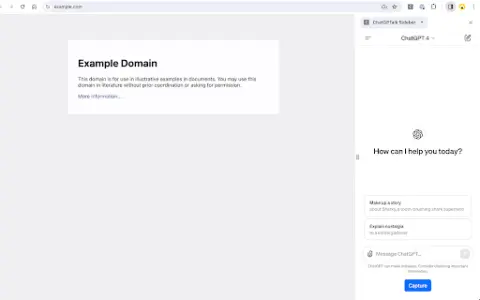
The ChatGPT integration in the sidebar facilitates text capture and interaction.
Introduction
ChatGPT integration in a sidebar for easy text capture and interaction.
What is the ChatGPTTalk Sidebar AI Chrome extension/plug-in?
The ChatGPTTalk Sidebar extension enhances the web browsing experience by integrating ChatGPT into a convenient sidebar. It allows users to extract text from web pages or YouTube subtitles and automatically copy it into the ChatGPT input field for generating summaries or performing other interactions. This extension also includes prompt templates and intelligent text segmentation features, which make it easier to work with longer documents.
How to use the ChatGPTTalk Sidebar AI Chrome extension/plug-in?
Install the ChatGPTTalk Sidebar extension. Open a web page or a YouTube video, and then click the “Capture” button in the sidebar to extract the text or subtitles. The extracted text will be automatically copied and pasted into the ChatGPT input field, along with a predefined prompt template. You can then interact with ChatGPT as needed.
The core functions of the ChatGPTTalk Sidebar AI Chrome extension/plugin
Integration of ChatGPT
Text capture
prompt template
YouTube subtitles
Intelligent text segmentation
Text capture
prompt template
YouTube subtitles
Intelligent text segmentation
Related
Sveltron
Sveltron is a tool that provides documentation assistance for the Svelte and SvelteKit projects.
Flashlearn.ai
AI-driven learning tools provided for Udemy courses: flashcards, quizzes, and mind maps.
iBrief
iBrief is an AI-powered tool that generates concise summaries of articles and makes them easy to share.
Trustero
The AI-based GRC platform is designed to automate ongoing compliance efforts and security-related tasks.
NotionAI Plus
Browser extensions that enable adding NotionAI functionality to any website, allowing for text analysis and summary generation.
MyGPTReader
An open-source Slack bot designed for content summarization and voice communication.