AI TOOL / #06524
Speak based on Azure Speech
Text-to-speech extension using Azure Speech with support for multiple languages and Chrome live subtitles.
Introduction
Text-to-speech extension using Azure Speech, supports many languages and Chrome Live Caption.
What is Azure Speech TTS Extension ai chrome extension/plugin?
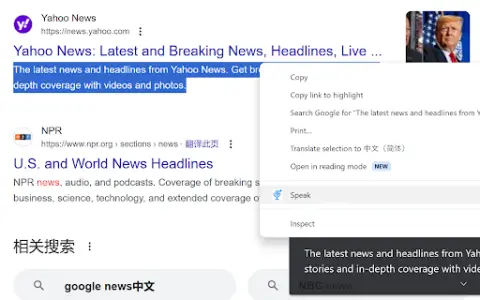
This is a text-to-speech (TTS) extension that leverages the Azure Speech service to convert selected text to audio. It supports multiple languages and integrates with Chrome's Live Subtitles feature for enhanced accessibility. Users need to configure the extension using their Azure Speech Service API key to enable TTS functionality.
How to use Azure Speech TTS Extension ai chrome extension/plugin?
Install the extension, configure it with your Azure Speech Service API key, select text on a web page, and use the extension to play audio for the selected text. Audio playback will be based on the selected language and voice settings.
Core features of Azure Speech TTS Extension ai chrome extension/plugin
Text-to-speech using Azure Speech Service
Support multiple languages
Integrate with Chrome Live Subtitles
Configurable voice settings
Support multiple languages
Integrate with Chrome Live Subtitles
Configurable voice settings
Related
Salemaker
Salemaker uses AI to generate personalized videos in order to improve response rates and attendance levels at meetings.
Adorno AI
An AI-powered audio generation platform for video creators that provides customized sound effects and atmospheres.
Trancy
Language learning assistant with bilingual subtitles and AI-powered translation.
HelloRecap
Applications based on artificial intelligence convert audio recordings into actionable insights through transcription and summarization.
VoicePen AI
An AI tool that quickly converts audio, video, and website content into blog posts.
SendVocal: AI Voice Mail & Transcription
Record voice messages directly through your browser and send them; AI transcription will be performed immediately.