AI TOOL / #06632
Talk to GPT
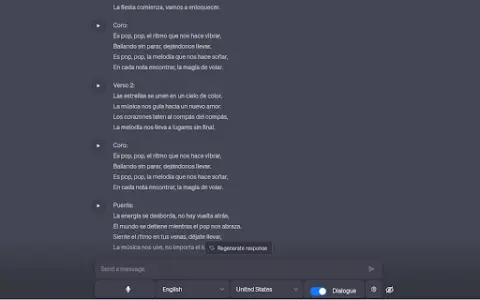
A Chrome extension designed for voice interaction with ChatGPT, supporting multiple languages and error correction features.
Introduction
Chrome extension for voice interaction with ChatGPT, supporting multiple languages and error correction.
What is the Talk to GPT AI Chrome extension/plug-in?
“Dialogue with GPT” is a Chrome extension that enables users to interact with ChatGPT on chat.openai.com via their microphone. It utilizes the browser’s speech recognition API to convert spoken audio into text and supports multiple languages. Users can also adjust the language settings and enable ChatGPT’s error-correction functionality.
How to use the Talk to GPT AI Chrome extension/plug-in?
Install the Talk to GPT Chrome extension. Visit chat.openai.com and use your microphone to utter your query. This extension will transcribe your voice and send it to ChatGPT.
The core functionality of the GPT AI Chrome extension/plug-in.
Provide voice input for ChatGPT.
Multi-language support
Language level adjustment
ChatGPT corrects errors.
Multi-language support
Language level adjustment
ChatGPT corrects errors.
Related
uxsniff.com
AI-driven website optimization user experience analysis tool.
Song Demo AI
An AI music generator and a text-to-music converter that utilize the Suno AI and Audio AI models.
EduX
The AI-powered Duolingo English exam practice platform provides scoring and feedback.
SoundType AI
An AI-powered audio and video transcription service that offers summary generation and collaboration features.
Voxify
Voxify is an AI-based voice generator that can convert text into audio in various languages.
TubeOnAI
AI-based summary generators and content reuse tools, suitable for use with videos, podcasts, articles, and documents.