AI TOOL / #06641
Speech to Text
A Chrome extension that allows users to create notes with customizable backgrounds and fonts, either by using voice commands or by typing text.
Introduction
Chrome extension for creating notes via speech or text with customizable backgrounds and fonts.
What is a Speech to Text AI Chrome extension/plug-in?
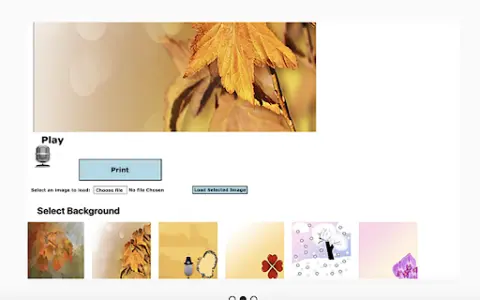
Voice-to-Text is a Chrome extension that allows users to take notes by speaking or by copying and pasting text. It offers the option to choose a background image or upload a custom one, as well as the ability to select a font before printing the notes. This extension is designed to be useful for creating notes in various situations – whether it’s for Thanksgiving, festive occasions, or just for fun.
How to use the Speech to Text AI Chrome extension?
Users can generate text by speaking into the microphone, or they can copy and paste existing text into the extension. Next, they can customize their notes by selecting a background image or uploading their own photo, choosing a font, and finally printing the notes.
The core functionality of the Speech to Text AI Chrome extension/plug-in
Converting speech to text to create notes
Paste the text to create a note.
Custom background image available.
Font selection
Printing function
Paste the text to create a note.
Custom background image available.
Font selection
Printing function
Related
LiveTranslate
Scan the code to listen to AI simultaneous interpretation.
LitStudy AI
AI tools designed for content creators, aimed at efficiently extracting knowledge and integrating information.
Language REACTOR
A language learning toolkit designed for use with Netflix, YouTube, books, and web pages, featuring dual subtitles and artificial intelligence capabilities.
Circleback
AI-powered meeting recording, transcription, and subsequent automation tasks – compatible with a wide range of platforms.
Cygentive
An AI voice assistant designed for automating business telephone operations.
SOAPME.AI
An artificial intelligence tool that automatically generates SOAP notes from audio conversations.