AI TOOL / #06738
Chat GPT Logger
An extension tool used to save ChatGPT conversations as local text files.
Introduction
Extension to save ChatGPT conversations to a local text file.
What is the GPT Chat Logger AI Chrome extension/plug-in?
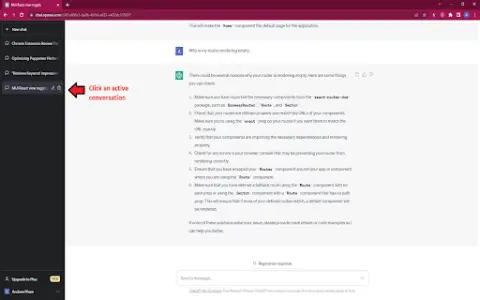
The GPT Chat Recorder is an extension that allows you to save active conversations from Chat GPT as text files on your computer. All you need to do is click on an ongoing conversation, then click the save icon, and finally save the file to your device. These steps are also illustrated in the image provided.
How to use the GPT Chat Logger AI Chrome extension/plug-in?
Click on an active conversation within ChatGPT, select the save icon, and then save the file to your computer.
The core functionality of the GPT Chat Logger AI Chrome extension/plug-in
Save the ChatGPT conversation as a local text file.
Related
AiCogni
An AI chatbot and writing assistant powered by ChatGPT, compatible with both voice commands and the WearOS platform.
cyara.com
An AI-driven customer experience transformation platform for customer experience assurance and optimization.
LingoLooper
AI-based language learning apps offer immersive dialogue practice with AI virtual characters.
AiRepeater
An AI-based shadow learning tool for language learning and pronunciation improvement.
Pinarify AI
An AI-powered app for note-taking, PDF analysis, and YouTube video summarization.
VoiceRec: AI Vocal Recorder
An AI-powered voice recorder, designed to capture, transcribe, and share audio recordings.