AI TOOL / #07222
ReadImage
Extract, edit, and copy text from images on web pages.
Introduction
Extracts, edits, and copies text from images on web pages.
What is Image Text Extractor ai chrome extension/plugin?
This extension allows users to extract text from images displayed on web pages. It supports common image formats such as jpg, jpeg, png and bmp. After extraction, the text can be edited and copied.
How to use Image Text Extractor ai chrome extension/plugin?
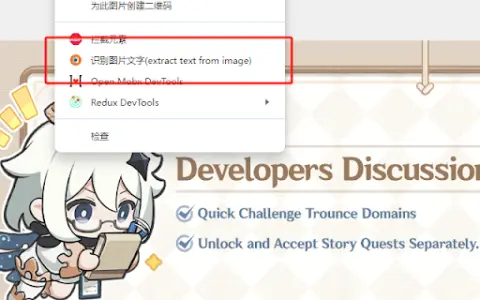
Hover your mouse over the image, right-click and select "Extract text from image". Press "Ctrl + Q" to view the extracted text on the extension page, where it can be edited and copied.
Image Text Extractor ai chrome extension/plugin core features
Extract text from images on web pages
Edit extracted text
Copy extracted text
Edit extracted text
Copy extracted text
Related
CoinGPT
A free app that identifies and appraises coins, stamps, banknotes, and antiques from photos.
GIZO- Safe Driving Global Challenge
Video remote information processing based on artificial intelligence contributes to safer and more sustainable modes of transportation.
Screenshot AI
Screenshot AI utilizes artificial intelligence to extract information from images, thereby simplifying the processes of searching and organizing content.
UnificAlly
UnificAlly - Your Affordable AI API Portal
StructiFi
AI-powered OCR and data extraction tool for structured data conversion.
ScantextAI
ScanTextAI is an online OCR service designed to extract text from images.