AI TOOL / #08846
Copy for Chat GPT
An extension used to copy ChatGPT responses and check for plagiarism.
Introduction
Extension to copy ChatGPT responses and check for plagiarism.
What is the Plagiarism Detector Extension for Chrome – an extension/plug-in for Google Chrome?
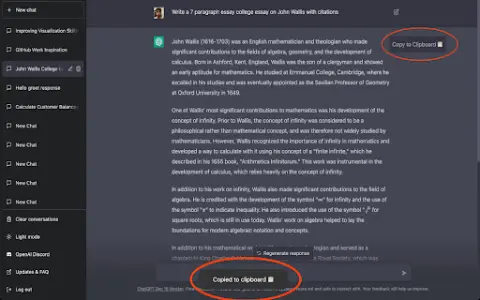
This extension allows you to copy the responses generated by ChatGPT by clicking a button or using the CMD+K shortcut key, and then have those responses checked by plagiarism detection tools.
How to use the Plagiarism Detector Extension for Chrome?
You can use this extension by clicking the copy button on ChatGPT’s response or by pressing CMD+K. The copied text will be automatically checked to determine whether it contains any plagiarized content.
The core functionality of the Plagiarism Detector Extension for Chrome.
One-click to copy the response from ChatGPT
Use the CMD+K shortcut key to copy.
Automatic plagiarism detection
Use the CMD+K shortcut key to copy.
Automatic plagiarism detection
Related
Aftercare
An AI-driven investigation platform that features intelligent follow-up questions and automated data analysis capabilities.
MalwareAI Browser Security
A Chrome extension that uses artificial intelligence to detect and block malicious documents and links.
Verisquad
An artificial intelligence-based system for fact-checking, statement verification, and truth detection.
Gptzero me
AI detector for identifying text generated by AI models such as ChatGPT.
carcogroup.com
CARCO provides fraud and risk prevention technology to the insurance industry.
AHX – Twitter/X.com AI Helper
A multi-functional AI tool used for generating summaries, conducting fact-checking, searching for resources, and creating emojis, among other tasks.