AI TOOL / #06228
Two Way Voice for Bing AI
Bing AI's voice interaction capabilities enable support for voice-based questions and answers.
Introduction
Voice interaction extension for Bing AI, enabling voice-based questions and responses.
What is the Bing AI Voice Extension, an Chrome extension/plugin?
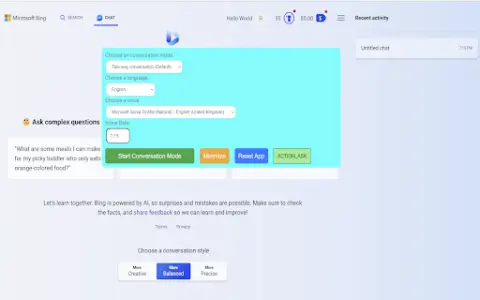
This extension enhances the Bing AI website by enabling voice interaction. Users can pose questions verbally and receive answers in either audio or text format. It offers the convenience of hands-free operation and supports multiple languages, including Nepali, Chinese, and Korean.
How to use the Bing AI Voice Extension for Chrome?
Enable the dialogue mode within the Bing AI website. This extension manages the sequence of questions and answers between you and Bing AI. You can choose from three modes: two-way audio communication, text input for voice responses, or text input for audio replies.
The core functionality of the Bing AI Voice Extension for Chrome.
Voice-based questions and answers
Multiple dialogue modes
Multi-language support (Nepali, Chinese, Korean)
Automatic round-robin scheduling
Multiple dialogue modes
Multi-language support (Nepali, Chinese, Korean)
Automatic round-robin scheduling
Related
Voice Control for Netflix
Use voice control to operate Netflix: play, pause, fast-forward, and more.
FixMeBot
AI-powered language assistant for text correction, rewriting and translation.
Speaksai (TalkerAI)
Speakesai is a voice AI application that provides instant answers through speech recognition technology.
Bearly
An AI tool that helps researchers and content creators read, write, and learn more efficiently.
RollerStory
Create personalized, high-definition video stories for children that are narrated using voices.
TexttoSpeech.im: Convert Text to Speech Free Online
A free online tool that converts text into speech using artificial intelligence, offering natural-sounding results and the option to download the converted files.